

When people talk about modern Business Intelligence, the conversation usually revolves around interactive dashboards, self-service analytics, and AI-powered insights. This often creates the impression that traditional paginated reports are becoming obsolete.
In practice, however, the exact opposite is true.
With Microsoft Fabric, paginated reports remain an integral part of the platform—and for good reason. There are many scenarios where precision, repeatability, and a fixed layout are far more important than interactivity.
Dashboards Answer Questions – Paginated Reports Document Outcomes
Power BI reports and dashboards are excellent for exploring data, identifying relationships, and supporting decision-making.
Paginated reports serve a different purpose:
They deliver information in a precisely defined format, regardless of when or by whom the report is generated.
This level of consistency is essential for many organizations.
More Than Reporting – A Key Component of an End-to-End Architecture
A modern data platform does not end with analytics.
It ends when information is reliably delivered to people, systems, or business processes.
This is where paginated reports play a critical role within Microsoft Fabric.
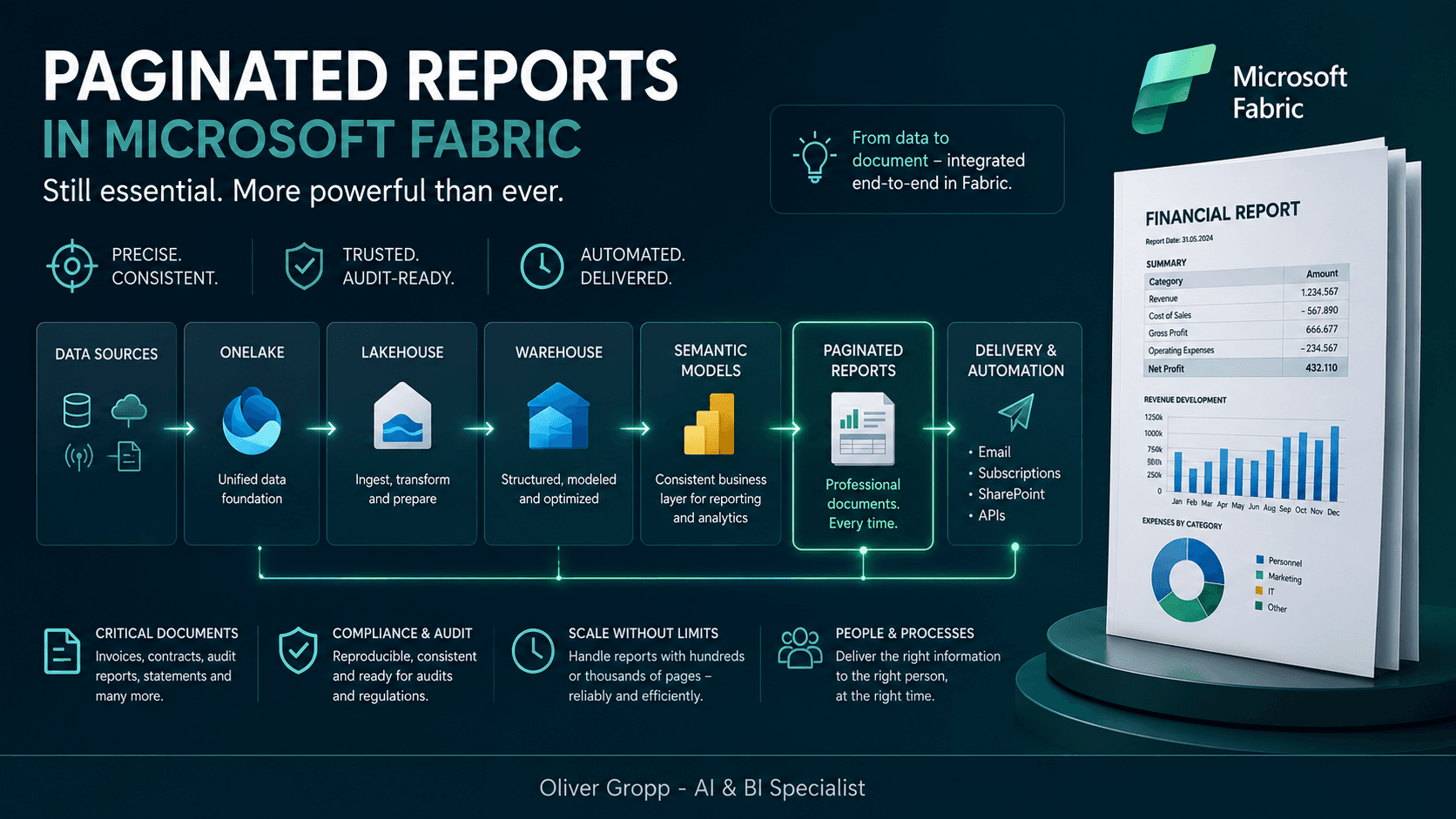
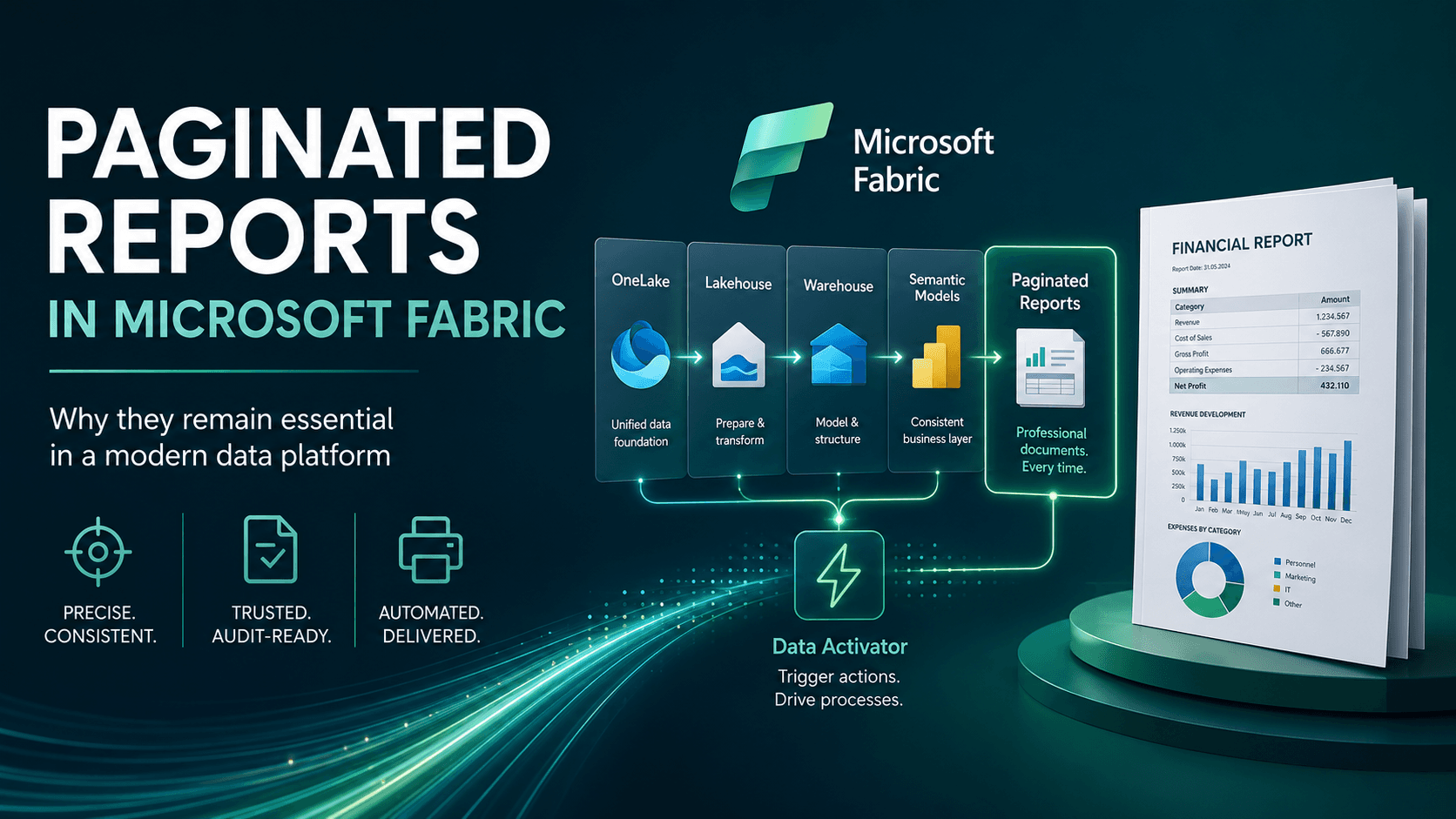
The data flows through a continuous process:
- Data from various sources is integrated into OneLake.
- Lakehouses provide the foundation for data engineering and large-scale data processing.
- Warehouses create structured, quality-assured, and reporting-optimized data models.
- Semantic models provide consistent access to data for analytics and reporting.
- Paginated reports transform this data into professional documents for business users, customers, partners, and regulatory authorities.
They represent the final stage of information delivery—the so-called last mile of reporting.
While dashboards visualize information and AI generates insights, paginated reports create the final document that can be read, distributed, archived, or used as evidence.
The Role of OneLake
OneLake follows the principle of storing data once and using it across multiple workloads.
Paginated reports benefit directly from this approach by accessing the same trusted data used by:
- Power BI reports
- Copilot
- Notebooks
- Spark workloads
- SQL Warehouses
- Data Science projects
As a result, organizations no longer need separate reporting databases or redundant copies of data.
All analytics and reporting rely on a single centrally governed source of truth—a fundamental requirement for strong data governance and consistent business metrics.
Lakehouse and Warehouse – Every Component Has Its Purpose
Microsoft Fabric clearly separates the responsibilities of each component within the data platform.
The Lakehouse is responsible for ingesting, transforming, and preparing raw data for analytical workloads. This is where Data Engineering, Data Science, and ELT processes take place.
The Warehouse then provides optimized relational structures that are particularly suitable for reporting, SQL queries, and standardized business reports.
Paginated reports benefit from this architecture because:
They consume already curated and validated data and can focus entirely on presentation and document generation.
This clear separation between reporting, data preparation, and data storage is a defining characteristic of modern data architectures.
Automation with Data Activator
The integration with Data Activator introduces another powerful capability.
Instead of generating reports exclusively on schedules, reports can be triggered by events.
Examples include:
- Warehouse inventory falls below a threshold.
- A machine reports a critical condition.
- An order exceeds a predefined limit.
- A payment becomes overdue.
These events can initiate notifications or automated downstream processes.
Paginated reports complement these scenarios by automatically generating the required documents, such as:
- Audit reports
- Management reports
- Customer communications
- Compliance documentation
This transforms reporting from a passive activity into an active part of digital business processes.
Where Paginated Reports Excel
Even in a modern Fabric environment, there are many scenarios where paginated reports remain the best solution:
- Invoices and delivery notes
- Financial statements and month-end reports
- Audit and compliance reporting
- Contracts and legal documentation
- Mail merge scenarios and personalized customer communications
- Production and quality reports
- Reports containing hundreds or thousands of pages
- Printed and PDF documents with strict page-break requirements
In all these cases, recipients are not expecting an interactive dashboard.
They expect a document.
AI Is Transforming Reporting – But Not Replacing It
With Copilot and generative AI, the way we analyze data is changing dramatically.
Users can increasingly ask questions in natural language.
Analyses are generated faster.
Summaries can be produced automatically.
However, once a document becomes legally relevant, is sent to customers, or must be archived, different requirements apply.
In these situations, organizations need:
- Reproducible results
- Clearly defined layouts
- Exact formatting
- Complete documentation
- Audit-proof output
These requirements cannot currently be fully replaced by AI.
Instead, both worlds complement each other:
AI helps generate insights, while paginated reports ensure those insights are delivered in a standardized, traceable, and reliable format.
Paginated Reports Are Not a Step Backwards
Paginated reports are sometimes viewed merely as “old SSRS reports.”
That perspective misses their real value.
Today, they are a specialized tool designed for scenarios where dashboards are intentionally not the right solution.
Microsoft Fabric demonstrates this clearly.
While OneLake, Lakehouses, Warehouses, Real-Time Intelligence, Copilot, and modern analytics tools form the foundation of the data platform, paginated reports deliver professional document output within the same end-to-end architecture.
The real question is therefore not:
“Do we still need paginated reports?”
Instead, it is:
“For which requirements are they the best solution?”
Conclusion
Microsoft Fabric does not replace paginated reports—quite the opposite.
The platform integrates them seamlessly into a modern end-to-end data architecture.
From data ingestion through OneLake, processing in the Lakehouse, modeling in the Warehouse, and automated delivery of standardized documents, organizations benefit from a continuous process without media disruptions.
Interactive dashboards help users understand data.
AI helps users analyze data.
Data Activator automates business processes.
And paginated reports provide value exactly where data must become an official document.
They are not relics of past BI solutions, but rather an essential building block of modern Microsoft Fabric architectures.
What's Your Perspective?
What role do paginated reports play in your Fabric projects?
Do you already use them as part of an end-to-end architecture, or primarily for traditional PDF and print-based reporting?